Fashion Pitch Deck PowerPoint
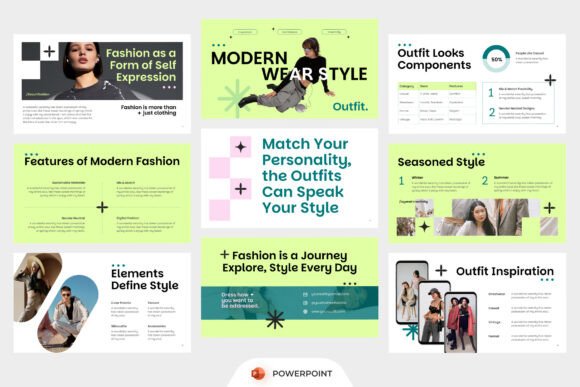
If you’ve ever spent hours wrestling with fonts, alignment, and placeholder images just to make a fashion presentation feel cohesive—this is the reset button you’ve been waiting for. Fashion Pitch Deck PowerPoint isn’t another generic slide deck. It’s a purpose-built visual toolkit designed specifically for how fashion professionals think, pitch, and tell stories.
Whether you’re launching a capsule collection, pitching to a boutique buyer, briefing an influencer, or presenting seasonal trends to your marketing team, this template bridges the gap between editorial polish and practical functionality. It doesn’t ask you to become a designer—it gives you the structure, rhythm, and aesthetic confidence to communicate like one.
Why This Template Fits Fashion—Not Just Slides
Fashion thrives on contrast: minimalism meets boldness, heritage meets street, utility meets expression. The Fashion Pitch Deck PowerPoint mirrors that duality. Its layouts aren’t just “pretty”—they’re editorially informed. Think double-page spreads that echo high-end lookbooks, typography pairings that reflect current season mood boards, and infographic slides built for translating fabric stats, color palettes, or customer insights into visual shorthand.
Unlike generic business templates that force fashion content into rigid corporate grids, this one starts from the premise that visuals *are* the message. Each slide has breathing room, intentional white space, and typographic hierarchy calibrated for impact—not bureaucracy.
What Makes It Work Behind the Scenes
The strength of Fashion Pitch Deck PowerPoint lies in its thoughtful constraints:
- 16:9 widescreen ratio—optimized for modern projectors, Zoom screens, and digital handouts without cropping or distortion;
- 100% editable vector-based elements—swap colors, resize graphics, adjust spacing without pixelation or layer confusion;
- Included free font—licensed and pre-installed, so your headline weight and body text render consistently across devices;
- No stock image dependency—all image placeholders are clearly marked, so you drop in your own photography, mood boards, or campaign assets without fighting embedded watermarks or licensing traps.
And yes—it comes with a concise help guide. Not a 40-page manual, but a quick-reference PDF covering layer naming conventions, color palette swatches, and how to update master slides without breaking animation triggers.
Real Uses—Beyond the Obvious Pitch
It’s easy to assume this is only for investor decks. In practice, users apply Fashion Pitch Deck PowerPoint in ways its creators didn’t anticipate—and that’s where its flexibility shines.
A Brooklyn-based streetwear startup used it to build their first wholesale kit—not just for buyers, but as a training tool for retail staff. They replaced product slides with QR-linked video lookbooks and swapped static size charts for animated fit guides.
An independent stylist repurposed the “brand voice” and “mood evolution” slides to create a client onboarding deck—replacing runway imagery with real-life client transformations and lifestyle shots. Her conversion rate on discovery calls increased by 32%, she told us, because clients *saw themselves* in the narrative—not just the clothes.
Educators at a design college use the template as a teaching scaffold. Students submit collection proposals using the same framework, making peer review consistent and critique more focused on concept and execution—not formatting inconsistencies.
Branding That Doesn’t Need a Designer
You don’t need a full branding package to project cohesion. With Fashion Pitch Deck PowerPoint, consistent tone begins with smart defaults: a restrained color system (easily customized), intentional type scale, and slide-to-slide rhythm that reinforces your brand’s pacing—whether that’s urgent and kinetic (for limited drops) or calm and considered (for sustainable lines).
One emerging knitwear label used the “seasonal narrative” section to map yarn sourcing, dye methods, and artisan partnerships—not as bullet points, but as illustrated timelines with custom icons. Their buyers responded not just to the products, but to the clarity of their values.
What to Keep in Mind Before You Start
This isn’t magic—it’s a tool. Your results depend on how thoughtfully you use it. Here’s what seasoned users recommend:
- Start with your story, not your slides. Sketch your core message on paper first. What’s the single thing you want remembered? Let that dictate which sections you keep, condense, or skip entirely.
- Respect the whitespace. It’s tempting to fill every frame—but fashion presentations gain authority through restraint. If a slide feels empty, ask: is this silence serving the idea?
- Test early on real devices. A stunning serif headline may blur on a low-res projector. Preview in PowerPoint’s “Slide Show” mode—not just edit view—to catch rendering quirks.
- Export smart. For email delivery, use PDF/X-4 with embedded fonts. For live presentations, stick with native .pptx—animations and transitions behave more predictably.
Who Benefits Most—and Why
This template resonates strongest with people who value time, clarity, and visual integrity—but don’t have (or need) full-time design support. Freelance stylists preparing campaign pitches. Boutique owners building seasonal buy plans. Apparel founders refining their DTC launch narrative. Even bloggers curating brand collab decks for media kits.
It’s not for those who want drag-and-drop “done-for-you” slides. But if you understand your audience, have strong source material (photos, sketches, data), and want a framework that elevates—not obscures—that work, Fashion Pitch Deck PowerPoint delivers professional-grade output without the learning curve of design software.
At its best, it removes friction—not creativity. You spend less time adjusting margins and more time refining your point of view. Less time hunting for fonts and more time choosing the right photo. Less time explaining your vision—and more time watching it land.