Market Insight Plan PowerPoint
Imagine standing in front of stakeholders—whether it’s your startup team, a university class, or a client board—and confidently presenting market data that’s clear, credible, and visually compelling. That’s what the Market Insight Plan PowerPoint is built to support: a professional, ready-to-use presentation template designed not just to look polished, but to function intuitively for real-world insight work.
What It Is—And What It Isn’t
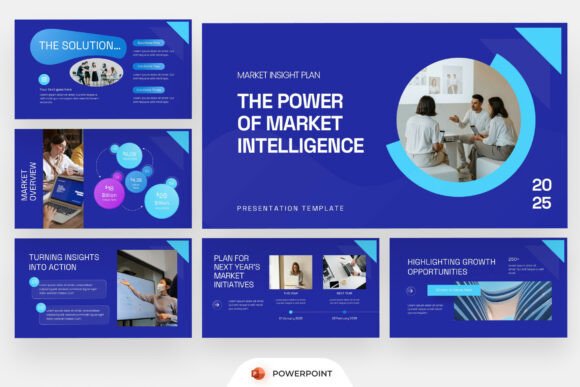
The Market Insight Plan PowerPoint is a fully editable, 16:9 widescreen template focused on market research, strategic analysis, and business storytelling. It’s not a generic deck with clipart and placeholder text. Instead, it uses bold blue layouts, clean geometric shapes, circular visual accents, and modern infographic sections—all aligned with how professionals today interpret and communicate data. Typography is intentional, spacing is purposeful, and every slide serves a functional role: from competitive benchmarking and trend timelines to SWOT summaries and investment opportunity overviews.
Importantly, it doesn’t include stock images—so you bring your own visuals, ensuring authenticity and brand alignment. And because it ships with a help guide and free fonts, there’s no setup friction: open, edit, present.
Why It Matters—Depending on Who You Are
Different people turn to presentation tools for different reasons—and what makes the Market Insight Plan PowerPoint valuable shifts accordingly.
For Beginners & Students
If you're new to market analysis—or preparing your first capstone project—the template removes guesswork. You don’t need to design charts from scratch or wonder how to structure a “market sizing” slide. The built-in layouts guide your thinking: one section prompts segmentation logic, another walks through drivers of demand, and a third supports scenario-based forecasting. It’s like having a quiet mentor embedded in your slides—helping you organize ideas before you even write them.
For Freelancers & Consultants
You’re often juggling tight deadlines and diverse clients—from SaaS startups evaluating TAM to local retailers assessing foot traffic trends. Here, speed *and* credibility matter. With fully editable vectors and consistent styling, you can drop in custom data, adjust color schemes to match a client’s brand, and export polished PDFs—all in under an hour. No reformatting headaches. No inconsistent fonts. Just clarity, fast.
For Educators & Trainers
Teaching market research isn’t just about theory—it’s about showing students how insights translate into decisions. This template works as both a teaching aid and a student assignment rubric. You can use its structure to model best practices (e.g., “Here’s how to visualize competitor positioning without clutter”), then assign students to populate the same framework with real datasets. Its clean layout also scales well on classroom projectors or LMS embeds.
For Small Business Owners & Entrepreneurs
You likely don’t have a dedicated design team—but you *do* need to pitch to investors, update advisors, or align your team around growth priorities. The Market Insight Plan PowerPoint gives you a baseline of professionalism without requiring design skills. Replace placeholder text with your customer survey findings. Swap out the sample pie chart with your actual channel mix data. Add your logo, tweak the blue accent to match your website—and suddenly, your internal strategy review feels investor-ready.
For Content Creators & Marketers
If you produce reports, newsletters, or social explainers about industry shifts, this template helps you repurpose dense analytics into digestible narratives. For example, a blogger covering AI adoption in healthcare might use the “trend timeline” slide to show regulatory milestones alongside product launches—layered with simple icons and minimal text. Or a marketer building a quarterly competitive digest could adapt the “benchmark dashboard” layout to compare feature sets, pricing tiers, and user sentiment across three rivals.
What You Might Prioritize—And Why
No single tool fits all needs perfectly. How you weigh certain features depends on your context:
- Ease of use matters most if you’re time-crunched or unfamiliar with PowerPoint’s advanced features—this template avoids nested groups or locked layers, so editing stays intuitive.
- Flexibility comes into play if you regularly switch between industries: the modular slide design lets you reorder, hide, or duplicate sections without breaking formatting.
- Presentation quality is essential when perception impacts outcomes—like pitching to skeptical stakeholders or submitting a grant application where visual polish signals rigor.
- Long-term usefulness matters if you’ll reuse the structure across projects: since it’s fully editable and font-agnostic, you can adapt it year after year—not just for one-off decks.
Notably, cost isn’t a barrier here: it’s a one-time purchase with no subscriptions or hidden fees. And because it includes a help guide, there’s no steep learning curve—even if you’ve only used PowerPoint for basic bullet lists.
Real Use Cases—Not Hypotheticals
• A sustainability educator uses Slide 7 (“Market Opportunity Matrix”) to map local policy changes against emerging green-tech startups—then shares the file with students as a fillable worksheet.
• A solopreneur launching a niche e-commerce brand adapts the “Customer Persona” and “Channel Performance” slides to summarize early Shopify analytics—using them in a 10-minute investor intro.
• A university researcher streamlines a 45-slide conference presentation down to 12 core insights using the template’s visual hierarchy—keeping data integrity while improving audience retention.
• A marketing agency rebrands the template’s color palette for each client, then drops in live Google Analytics screenshots and CRM export tables—delivering branded, insight-led decks in half the usual time.
Does It Fit Your Next Project?
Ask yourself: Do you need to communicate market understanding—not just list facts? Are you balancing accuracy with accessibility? Do you value structure that guides thinking, not constrains it?
If yes, the Market Insight Plan PowerPoint serves as both scaffolding and finish—supporting depth without demanding design expertise. It won’t replace primary research or strategic judgment. But it does remove one layer of friction between your insights and the people who need to understand them.
It’s especially well-suited for projects where clarity, credibility, and consistency matter more than flashy animation or abstract visuals—think investor updates, internal strategy reviews, academic defenses, or client advisory sessions. If your goal is to make complex information feel grounded—not overwhelming—the template’s intentional restraint becomes its strength.