Tuberculosis Day Flyer Template: A Practical Tool for Clear, Confident Public Health Communication
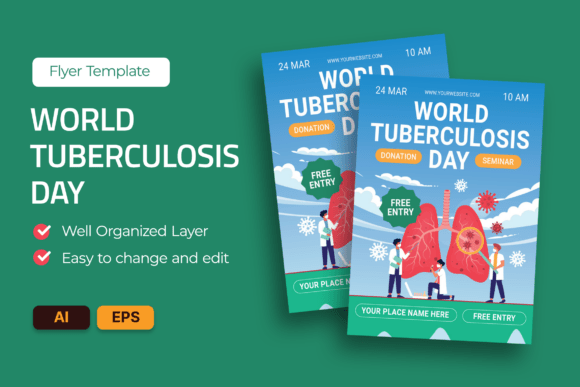
When launching a World TB Day campaign—or any public health education drive—your flyer isn’t just paper or pixels. It’s the first point of contact between your message and the community. That’s why the Tuberculosis Day Flyer Template stands out: it’s not a generic design, but a data-forward, structurally sound foundation built specifically for clarity, credibility, and action. Designed with real-world use in mind, it balances strong visual hierarchy with accessible typography, integrates key health statistics into an intuitive infographic layout, and delivers prevention guidelines in plain, actionable language—not medical jargon.
Yet many well-intentioned teams stumble before they even print a single copy. They assume “ready-to-use” means “plug-and-play,” or overlook small technical details that undermine impact, professionalism, or inclusivity. These aren’t minor oversights—they affect how seriously your message is taken, whether caregivers share your materials, and whether local clinics can adapt them quickly without design support.
Assuming Editability Means Effortless Customization
One frequent misstep? Assuming that because a Tuberculosis Day Flyer Template says “fully customizable,” anyone on the team can open it in Illustrator and make changes smoothly. In reality, layers must be well organized—not just named, but logically grouped (e.g., “Infographic_Stats,” “Prevention_Bullets,” “Header_Text”). Without this, swapping a statistic or updating a call-to-action becomes time-consuming and error-prone.
For example, a regional NGO once replaced a national TB incidence figure but accidentally deleted the supporting icon set behind it—leaving a blank gap in the infographic. The fix took three hours, not thirty minutes, because layers weren’t locked or color-coded. A better approach: open the included Help Guide file first. Scan the layer structure, test one text edit, and verify fonts render correctly before finalizing content. Remember: “editable” doesn’t mean “no prep required.” It means you have control—if you understand the system.
Overlooking Print Specifications—Then Paying for It
Another common oversight involves print readiness. This template includes bleed, CMYK color mode, and 300 DPI resolution—standard requirements for professional offset printing. But some users skip verifying these settings after editing, especially when switching between digital sharing and physical distribution. If you export a version without bleed and send it to a local print shop, critical margins may get trimmed, cutting off vital contact information or QR codes.
Worse, exporting in RGB instead of CMYK can shift colors dramatically—making a calming blue appear washed-out or a warning red look dull. That undermines visual consistency across your campaign materials. Before sending files to print, always double-check: Is the document set to CMYK? Does the artboard include 3 mm bleed on all sides? Are all images embedded (not linked)? These checks take under two minutes—and prevent reprints, delays, and budget overruns.
Misjudging Accessibility Through Typography Alone
Many assume using “accessible fonts” means choosing something sans-serif and large. While that’s a good start, true accessibility goes deeper. This Tuberculosis Day Flyer Template uses free, open-licensed fonts—but their effectiveness depends on spacing, contrast, and hierarchy. For instance, line height below 1.4 can crowd lines for readers with low vision; light-weight font variants may vanish against textured backgrounds; and inconsistent heading sizes blur the information flow.
A clinic in Nairobi used the template’s teal color variant for a rural outreach event—only to find elders struggled to read the prevention steps under natural sunlight. The issue wasn’t the font itself, but the combination of medium-gray text on a pale background. Their fix? Switching to the high-contrast indigo version and increasing body text size from 10 pt to 11.5 pt. Lesson: preview your flyer in real-world lighting, test readability at arm’s length, and prioritize contrast ratios above aesthetic preferences.
Ignoring Localization Needs Too Late
Public health messages only land when they speak directly to people’s lives. Yet some teams finalize English-language content first—then realize too late that translation requires more than swapped words. Infographics need reflowed layouts for right-to-left languages; icons may carry unintended meanings across cultures; and statistics must reflect local epidemiology, not global averages.
Instead of treating localization as a last-minute add-on, build flexibility in early. Use the template’s layered structure to isolate text blocks from graphics. Keep stat callouts editable as separate text boxes—not fused into image assets. And before translating, consult local health workers: does “cough for more than two weeks” resonate as clearly in Swahili or Bengali as it does in English? Often, a slight rephrasing (“persistent cough lasting longer than 14 days”) improves comprehension without sacrificing accuracy.
Skipping the Help Guide—Even When It’s Free
The included Help Guide File isn’t filler—it’s your shortcut to confidence. It walks through layer naming conventions, explains which elements are safe to move versus lock, shows how to swap color palettes without breaking gradients, and clarifies how to update stock-image placeholders (even though actual stock images aren’t included). Skipping it is like assembling furniture without checking the manual: possible, but slower, riskier, and more frustrating.
One freelance designer spent half a day trying to adjust the TB symptom checklist—only to discover the bullet icons were part of a compound path, not individual shapes. The Help Guide had a two-sentence tip: “To edit symptoms individually, ungroup the checklist layer first (Object > Ungroup), then select each line.” That saved her client two revision rounds.
What to Check Before You Commit—or Customize
Before downloading, purchasing, or assigning work with this Tuberculosis Day Flyer Template, ask yourself:
- Does the file package include both AI and EPS versions—and are they truly A4-sized with bleed?
- Are all fonts listed in the Help Guide actually free for commercial use (not just “free to download”)?
- Can you easily replace placeholder text without disrupting alignment or spacing?
- Is the infographic structured so stats can be updated without redesigning the entire chart?
- Do the color variants offer sufficient contrast for printed and digital use—including accessibility standards like WCAG AA?
These aren’t nitpicky questions. They’re the difference between a flyer that informs, inspires trust, and drives behavior—and one that confuses, excludes, or gets filed away unread. With thoughtful use, the Tuberculosis Day Flyer Template supports more than awareness. It supports clarity. Confidence. Community impact.